Instant access to manage your personal health care journey
The CalvaryCare app is your companion on your care journey with us.
This handy app has been designed by our experts to give you instant access to all your important health care information and exclusive features right at your fingertips.
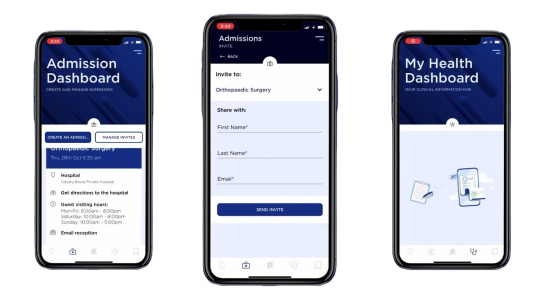
Key benefit and features
Here are just some of the exciting features available through the CalvaryCare app, designed to enhance your health care experience:
- Share your care journey with a loved one who can receive updates on your progress
- Your healthcare documentation: One place to easily access and find vital information including:
- Digital education covering pre/post operative information
- Discharge summary and other health-related material
- Maps: A wayfinding map to guide your way and find amenities within the hospital.
- Find a specialist: Access to a directory of Calvary specialists and contact information.
- E-admissions: You can also complete your admission details electronically via the app before you arrive. Head to our e-Admissions page for more information.
How to get started

1. Download
Download the CalvaryCare app from your selected app store or or scan the QR code below with your smartphone camera.
1. Download
Download the CalvaryCare app from your selected app store using the buttons below.

2. Create account
You’ll then receive a verification email to your chosen email inbox. If you do not see any verification emails from Calvary, check your junk mail.
Sign up using your email and verify your account.

3. Set up pin
We will prompt you to set a four digit pin, with an option to activate Face ID, for easy, secure access into your account.

Once this is complete, you’re all set to enjoy the benefits of CalvaryCare!
The CalvaryCare app is available on smartphones, iPads and tablets.
The online admission form is still available via our website, however, this option does not include other complementary features which are only available through the CalvaryCare app (e.g. sharing your care journey with a loved one).
If you prefer to complete your admission documents online, head to calvary.eadmissions.org.au
You can access the help function in the app for any technical issues.
For all matters regarding your upcoming admission, please contact your relevant hospital.
CalvaryCare app Helpdesk
If you are unable to access the in-app support, you can call our app helpdesk directly (available 9am to 5pm AEST Monday to Friday. Not available weekends or NSW/VIC public holidays):
No you don't! Whether you are a new or an existing patient, you can download the CalvaryCare app by scanning the QR code or searching ‘CalvaryCare’ in your app store.
You can request deletion of your CalvaryCare app account and associated app data at any time.
To request account deletion:
- Open the CalvaryCare app.
- Go to Help or Support in the app and submit a request to delete your account.
- If you are unable to access the app, contact the CalvaryCare app Helpdesk on 1800 798 226, Monday to Friday, 9am to 5pm AEST, excluding weekends and NSW/VIC public holidays.
- Please include the email address linked to your CalvaryCare app account so we can identify your account and process your request.
When your CalvaryCare app account is deleted, we will delete or de-identify information associated with your app account, such as your login details, app profile information, app preferences and app-only data.
When your CalvaryCare app account is deleted, we will delete the information associated with that account, including your login details, app profile information, app preferences and app-only data. We do not retain information associated with the deleted CalvaryCare app account after the deletion request is completed.
Deleting your CalvaryCare app account may prevent you from accessing features in the app, including healthcare documentation, admission-related information, wayfinding, specialist information, and care journey sharing.